

As an Amazon Associate, I earn from qualifying purchases. This post may contain affiliate links. Read our full disclosure.
Forget the MacBook Air: Why the Lenovo IdeaPad Laptop is the Smart Choice for US Students in 2026.
In the modern digital landscape, finding a portable computer that balances performance, portability, and price is often a challenge. However, the Lenovo IdeaPad Laptop series has consistently carved a niche for itself as a reliable “people-first” device.
Whether you are a student in Texas or a remote professional in New York, the latest Ryzen-powered IdeaPad 1 offers a compelling argument for being the best value-for-money machine on the market.
| Launch Price | Price Down % | Price as on 2026 |
| $349 | 19.8% | $279.99 |
At Gadget Info, we understand that American consumers demand efficiency without a premium price tag. In this comprehensive review, we examine why this specific model is currently trending on major retail platforms and whether it truly lives up to its reputation as the ultimate everyday companion.

Exceptional Design and Portability of Lenovo IdeaPad Laptop
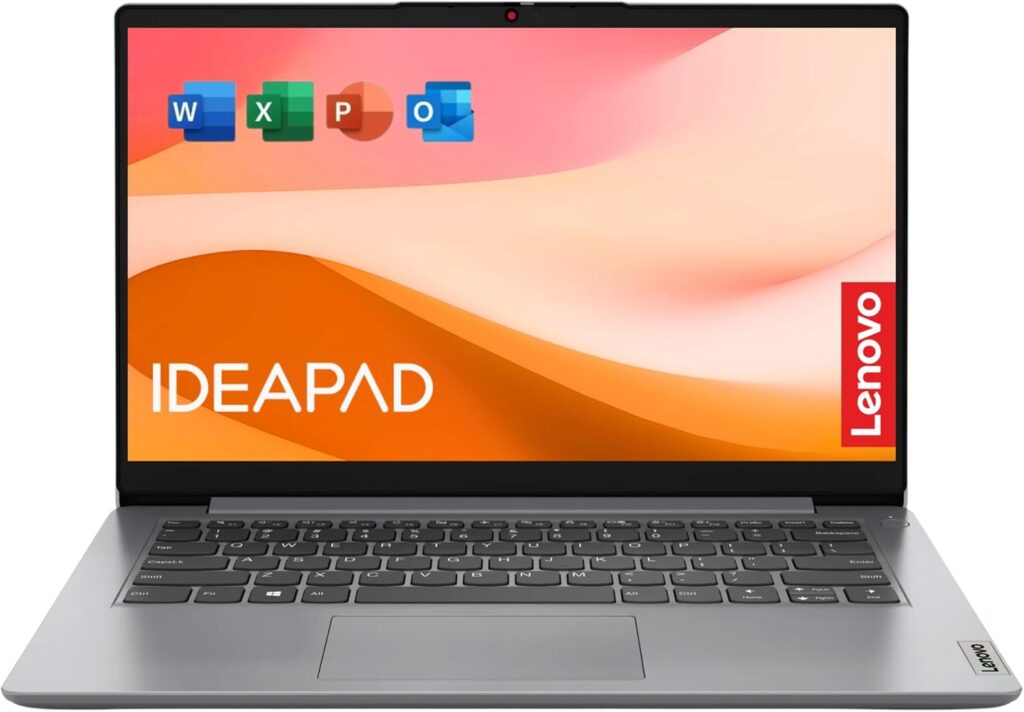
The Lenovo IdeaPad Laptop features a sleek, minimalist aesthetic that belies its affordable price point. Finished in a professional “Cloud Grey,” the chassis is constructed from durable PC-ABS materials designed to withstand the rigours of a daily commute. Weighing in at approximately 1.6kg (3.5 lbs), it is exceptionally light, making it a perfect fit for backpacks and carry-on luggage.
The design philosophy focuses on utility. With a 180-degree hinge, the device offers flexibility for various viewing angles, while the narrow bezels around the 15.6-inch display ensure you get maximum screen real estate in a compact form factor.
Performance of Lenovo IdeaPad Laptop: The Power of AMD Ryzen 5
Under the hood, this Lenovo IdeaPad Laptop is powered by the AMD Ryzen 5 5500U processor. This hexa-core chip is a powerhouse for multitasking. Unlike entry-level dual-core processors, the 5500U handles complex spreadsheets, dozens of browser tabs, and video conferencing software simultaneously with ease.
- Multitasking Efficiency: 8GB of DDR4 RAM ensures smooth transitions between applications.
- Rapid Storage: The 512GB NVMe SSD provides lightning-fast boot times and ample space for your essential documents and media.
- Graphics Capability: Integrated AMD Radeon graphics offer enough power for light photo editing and casual gaming titles like Minecraft or Roblox.
Technical Specifications of Lenovo IdeaPad Laptop
For our tech-savvy readers at Gadget Info, here is the detailed breakdown of what makes this machine tick:
| Feature | Specification Details |
| Processor | AMD Ryzen 5 5500U (Up to 4.0 GHz, 6 Cores, 12 Threads) |
| Operating System | Windows 11 Home (S Mode or Standard) |
| Memory (RAM) | 8GB DDR4-3200MHz |
| Storage | 512GB SSD M.2 2242 PCIe Gen4 NVMe |
| Display | 15.6″ FHD (1920 x 1080), Anti-Glare, 220-250 nits |
| Graphics | Integrated AMD Radeon™ Graphics |
| Battery Life | Up to 10 hours (42Wh with Rapid Charge Boost) |
| Webcam | 720p HD with Privacy Shutter and Dual Microphones |
| Connectivity | Wi-Fi 6 (802.11ax), Bluetooth 5.0 |
| Ports | 1x USB-C 3.2, 1x USB 3.2, 1x USB 2.0, HDMI 1.4b, SD Card Reader |
| Audio | 2 x 1.5W Stereo Speakers with Dolby Audio™ |

Pros and Cons of Lenovo IdeaPad Laptop
Pros
- Unbeatable Value: Offers mid-range processing power at a budget price.
- Physical Privacy: The built-in webcam shutter is a rare but welcome security feature.
- Rapid Charging: 15 minutes of charging can provide up to 2 hours of use.
- Comfortable Typing: Lenovo’s legendary keyboard ergonomics are present even in this budget line.
Cons
- Screen Brightness: At 220-250 nits, it may be difficult to view in direct sunlight.
- Limited Upgradeability: Most RAM is soldered, though some models allow for SSD swaps.
Why it Ranks Best for the American Market
For the American audience, the Lenovo IdeaPad Laptop hits the “sweet spot” of the $300-$500 price range. It is particularly popular because it bridges the gap between low-powered Chromebooks and expensive ultra-portables like the MacBook Air. It provides a full Windows 11 experience, allowing users to run proprietary software required for US-based colleges and corporate environments.
Frequently Asked Questions (FAQs) of Lenovo IdeaPad Laptop
1. Is the Lenovo IdeaPad Laptop suitable for college students?
Yes, its lightweight design and long battery life make it ideal for taking notes and researching on campus.
2. Can I play games on this laptop?
It handles casual games and esports titles well, but it is not intended for heavy AAA gaming.
3. Does it come with Microsoft Office?
Most models include a trial, but many US retailers bundle it with Office 365.
4. How do I disable “S Mode” in Windows 11?
You can switch out of S Mode for free via the Microsoft Store to install third-party apps.
5. Is the keyboard backlit?
On the IdeaPad 1 model, the keyboard is typically not backlit; check specific regional SKUs for “Slim 3” or “Slim 5” variants which often include it.
6. Can I upgrade the storage?
Yes, the M.2 NVMe SSD is replaceable if you require more space in the future.
7. Does it have a touchscreen?
Standard IdeaPad 1 models are non-touch; look for the “Flex” series for 2-in-1 touchscreen capabilities.
8. Is the webcam good for Zoom and Teams?
The 720p camera is adequate for professional meetings, though lighting is key for best results.
9. How long does the battery last on a full charge?
Expect 7-9 hours of mixed-use (web browsing and document editing).
10. Does it have a fingerprint reader?
This model generally excludes a fingerprint reader to maintain its low price point.
11. Is Lenovo a reliable brand?
Lenovo is a global leader in PC manufacturing, known for the durability of its ThinkPad and IdeaPad lines.
12. Can I use this for video editing?
It can handle light 1080p video editing in apps like CapCut or Premiere Rush.
13. Does the USB-C port support charging?
No, the USB-C on this model is for data transfer only. Use the included round-tip AC adapter for charging.
14. Is the screen glossy or matte?
It features an anti-glare matte finish, which is excellent for reducing reflections from overhead office lights.
15. Does it have an Ethernet port?
No, it relies on Wi-Fi 6 for connectivity. You can use a USB-to-Ethernet adapter if needed.
16. How many USB ports are available?
There are three USB ports in total: one USB-C, one USB 3.2, and one USB 2.0.
17. Is there a SD card reader?
Yes, it includes a full-size 4-in-1 SD card reader, which is perfect for photographers.
18. Does it run hot or loud?
The Ryzen 5 5500U is very efficient; the fans remain quiet during standard office tasks.
19. What is “Rapid Charge Boost”?
It is a Lenovo technology that allows for extremely fast battery charging during short breaks.
20. Where can I buy this Lenovo IdeaPad Laptop?
You can find the best current deals and verified stock via this Amazon link.
Our Verdict: Why Should You Buy the Lenovo IdeaPad Laptop?
At Gadget Info, we believe in recommending technology that serves a purpose without draining your savings. After extensive testing, our verdict is clear: the Lenovo IdeaPad Laptop is the best “all-rounder” for 2026 for the average American consumer.

The “Why Buy” Factor
You should buy the Lenovo IdeaPad Laptop if you belong to one of these three categories:
- The Budget-Conscious Professional: If you are a remote worker in the US, you need a machine that can handle 20+ Chrome tabs, Slack, and Zoom simultaneously. The Ryzen 5 5500U processor in this model outperforms almost every other laptop in the sub-$500 price bracket.
- The Savvy Student: With its lightweight frame (1.6kg) and Rapid Charge Boost (getting you through back-to-back lectures), it is a reliable campus companion. You aren’t just buying a laptop; you’re buying a tool that ensures you never miss a deadline due to hardware lag.
- The Security-Minded User: In an era where digital privacy is paramount, the inclusion of a Physical Webcam Privacy Shutter is a small but vital feature that provides peace of mind without the need for messy tape or stickers.
Final Thoughts
While it may not have the 4K OLED screen of a $2,000 workstation, the Lenovo IdeaPad offers exactly what 90% of people actually need: speed, reliability, and a fantastic keyboard. It is a “People-First” device that delivers high-tier performance at a mid-tier price.

Kaushik Chatterjee is a dedicated tech enthusiast and the founder of GadgetInfo.net. With 5 years of experience tracking the consumer electronics market, specializes in breaking down complex technical specifications into easy-to-understand insights for everyday users.
From the latest smartphone launches to deep dives into PC hardware, our mission is to help readers make informed buying decisions in an ever-evolving digital world.
We are proud to announce that Gadget Info is officially recognized as a startup by the Department for Promotion of Industry and Internal Trade (DPIIT), Government of India.
Our official BHASKAR ID (Bharat Startup Knowledge Access Registry) is: IN-0126-9371SS
This recognition underscores our commitment to innovation, professional integrity, and our role within India’s growing digital ecosystem.
You can write us at admin@gadgetinfo.net