
As an Amazon Associate, I earn from qualifying purchases. This post may contain affiliate links. Read our full disclosure.
Anker Soundcore P30i: The Ingenious 2-in-1 Earbuds with a Secret Feature Every Commuter Needs.
In the fast-evolving world of personal audio, finding a pair of earbuds that balances cost with high-end features often feels like searching for a needle in a haystack. However, the Anker Soundcore P30i has recently emerged as a formidable contender, promising premium active noise cancellation (ANC) and immersive sound without the triple-digit price tag.
At Gadget Info, we have put these earbuds through rigorous testing to see if they truly live up to the hype. Whether you are a commuter in New York City or a student in California, this review explores why the P30i might be the smartest tech investment you make this year.
Price of Anker Soundcore P30i
| Launch Price | Price Increased % | Price as on 2026 |
| $24 | 14.3% | $27.99 |

Design and Ergonomics: Built for Daily Life
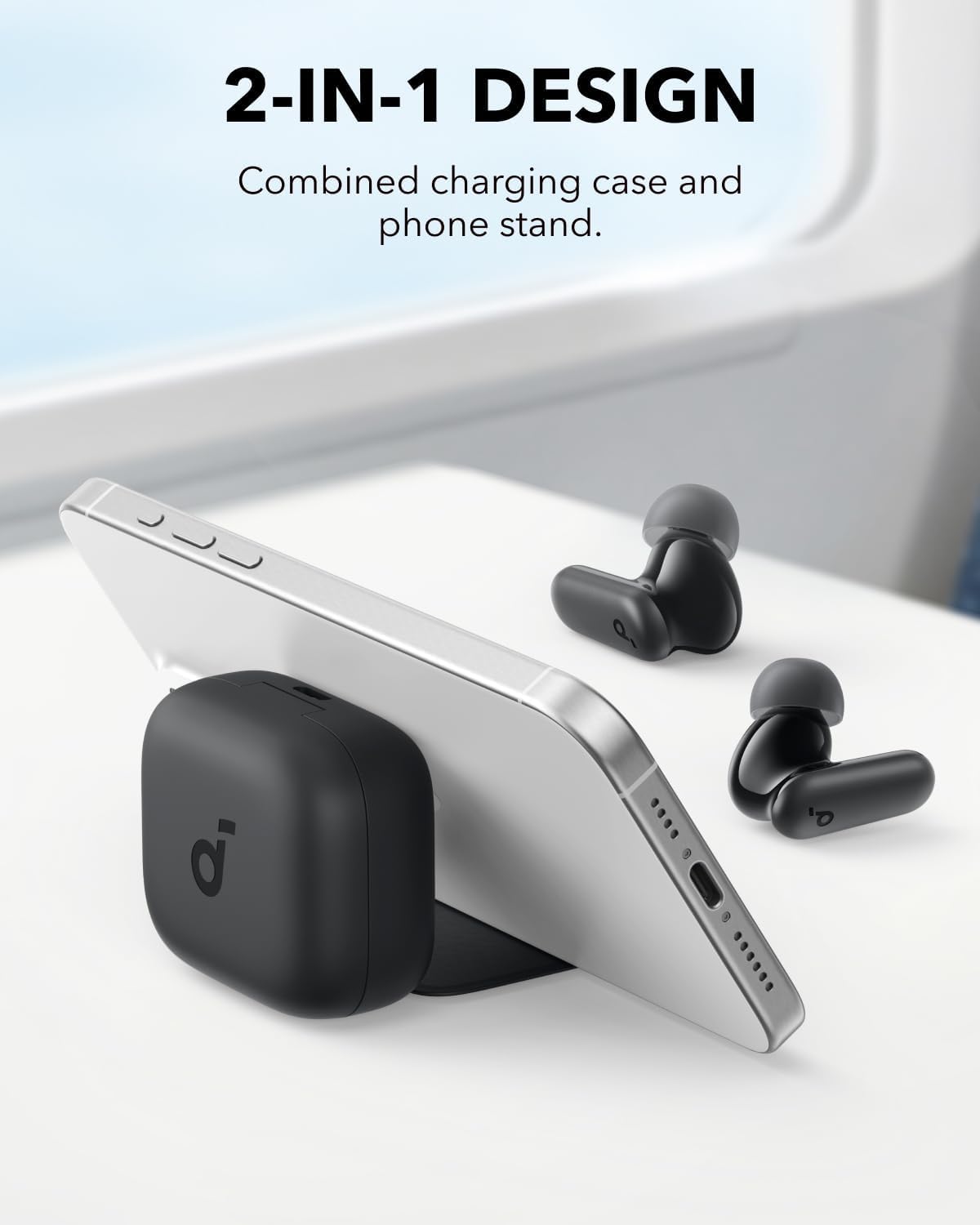
The first thing you notice about the Anker Soundcore P30i is its sleek, pebble-like charging case. Anker has cleverly integrated a “2-in-1” feature here: the case doubles as a phone stand. This is a game-changer for American users who enjoy watching Netflix or YouTube during lunch breaks or on long flights.
The earbuds themselves sport a classic stem design. They are lightweight and ergonomically shaped to fit snugly in the ear canal. During our four-hour wear test, we experienced zero “ear fatigue,” making them ideal for long-duration use. Furthermore, with an IP54 rating, they are resistant to dust and splashes, ensuring they survive a sweaty workout or a sudden drizzle.
Sound Performance: Deep Bass, Clear Highs
Anker is renowned for its “BassUp” technology, and the Anker Soundcore P30i does not disappoint. Equipped with 10mm oversized drivers, these earbuds deliver a punchy low-end that brings genres like Hip-Hop and EDM to life.
However, it’s not just about the bass. Through the Soundcore App, users can access 22 preset EQ settings or create their own custom sound profile. The mid-tones remain crisp, ensuring that podcasts and vocals are never drowned out by the percussion. For an entry-level device, the soundstage is surprisingly wide, providing an immersive “3D” feel.
Active Noise Cancellation (ANC) Capability
In a noisy world, ANC is no longer a luxury—it’s a necessity. The Anker Soundcore P30i features “Strong and Smart” noise cancelling. Anker claims it can reduce ambient noise by up to 42dB.
In our real-world testing:
- Low-frequency hums (plane engines, air conditioners) were almost entirely eliminated.
- Mid-range chatter (office environments) was significantly muffled.
- Adaptive Mode worked seamlessly, adjusting the level of cancellation based on the surrounding environment.

Technical Specifications of Anker Soundcore P30i Noise Cancelling Earbuds
For the tech enthusiasts at Gadget Info, here is the breakdown of what’s under the hood:
| Feature | Specification |
| Driver Size | 10mm Dynamic Drivers |
| Noise Cancellation | Hybrid ANC (up to 42dB) |
| Bluetooth Version | 5.3 (Fast & Stable Connection) |
| Playtime (Earbuds) | Up to 10 Hours |
| Playtime (With Case) | Up to 45 Hours |
| Fast Charging | 10 mins = 2 hours of playback |
| Water Resistance | IP54 (Sweat and Dust Resistant) |
| Microphones | 4 Mics with AI Noise Reduction |
| App Support | Soundcore App (iOS and Android) |
| Multipoint Connection | Yes (Connect to 2 devices) |
Connectivity and Battery Life of Anker Soundcore P30i Noise Cancelling Earbuds
One of the standout features of the Anker Soundcore P30i is the Multipoint Connection. This allows you to stay connected to your laptop for a Zoom call while simultaneously being paired with your smartphone. It switches intelligently between the two, a feature rarely seen at this price point.
Battery life is equally impressive. You get a massive 45 hours of total playtime with the case. If you find yourself running low, a quick 10-minute charge provides 2 hours of listening time—perfect for those who are always on the go.

Pros and Cons of Anker Soundcore P30i Noise Cancelling Earbuds
The Pros
- Exceptional Value: Premium features at a fraction of the cost of competitors.
- Clever Case Design: The built-in phone stand is genuinely useful.
- Strong ANC: Effectively blocks out the bustle of American city life.
- Customisable Audio: The Soundcore App is one of the best in the industry.
- Long Battery: 45 hours ensures you only charge once a week.
The Cons
- Microphone in Wind: While AI-enhanced, call quality can struggle in very windy outdoor conditions.
- Plastic Feel: The case is lightweight, which is great for pockets but feels less “premium” than metal-clad alternatives.
Our Verdict: Why Should You Buy the Anker Soundcore P30i?
At Gadget Info, we believe the Anker Soundcore P30i represents the pinnacle of “Value Engineering” in 2026. While many premium brands charge upwards of $150 for active noise cancellation, Anker has democratised high-end audio by delivering a product that punches well above its weight class.
The “No-Brainer” Purchase for Most Users
If you are an American commuter, a busy student, or someone who simply refuses to overpay for a logo, the P30i is designed for you. It successfully bridges the gap between “budget” and “premium” by focusing on the features that actually impact your daily life.
Why You Should Add This to Your Cart:
- Unbeatable Noise Defence: The hybrid ANC, capable of silencing up to 42dB of ambient noise, is a lifesaver for focusing in loud cafes or surviving a noisy subway ride.
- The Ultimate Media Companion: The 2-in-1 charging case with a built-in phone stand is a simple yet revolutionary addition for anyone who watches videos on the go.
- Audio That Adapts to You: Unlike many “fixed-sound” competitors, the Soundcore App provides 22 EQ presets, ensuring the 10mm drivers sound exactly how you want them to.
- Reliability You Can Trust: With a staggering 45-hour total battery life and a fast-charge feature (10 mins for 2 hours), you will rarely find yourself without your soundtrack.
- Seamless Productivity: The Multipoint Connection allows you to switch from a laptop meeting to a mobile call instantly, making it a perfect tool for the modern hybrid worker.
The Gadget Info Final Word: The Anker Soundcore P30i isn’t just a pair of earbuds; it is a versatile tool for the modern lifestyle. It offers the best price-to-performance ratio currently available in the US market. If you want “Pro” features without the “Pro” price tag, this is your best bet.
Frequently Asked Questions (FAQs) of Anker Soundcore P30i Noise Cancelling Earbuds
- Is the Anker Soundcore P30i good for working out?
Yes, its IP54 rating makes it resistant to sweat and dust, and the fit is secure enough for running.
- Does it support wireless charging?
No, the P30i charges via USB-C to keep the price point accessible.
- Can I use one earbud at a time?
Yes, both the left and right earbuds support “Mono Mode.”
- How do I reset the earbuds?
Place them in the case and hold the button on the case for 10 seconds until the LEDs flash.
- Is the noise cancellation adjustable?
Yes, you can toggle between ANC, Transparency Mode, and Normal Mode via the app.
- Does it work with Siri or Google Assistant?
Yes, voice assistants can be triggered via the touch controls.
- What is the Bluetooth range?
Approximately 33 feet (10 metres) in an open space.
- How many mics does it have?
It features 4 microphones with AI algorithms for clearer calls.
- Are they compatible with iPhones?
Absolutely. They work perfectly with all Bluetooth-enabled iOS and Android devices.
- Does the case support fast charging?
Yes, 10 minutes of charging gives you 2 hours of use.
- How is the latency for gaming?
There is a “Gaming Mode” in the Soundcore App that reduces latency for a better sync.
- Can I change the touch controls?
Yes, the Soundcore App allows you to customise single, double, and long-press actions.
- What comes in the box?
Earbuds, charging case, S/M/L ear tips, and a USB-C cable.
- How does the phone stand work?
The lid of the charging case flips out to act as a brace for your smartphone.
- Does it support LDAC?
No, the P30i supports AAC and SBC codecs.
- Is it better than the Soundcore P20i?
Yes, the P30i adds Active Noise Cancellation and the phone-stand case.
- Can I find my lost earbuds?
The Soundcore App has a “Find My Device” feature that emits a loud noise from the buds.
- How do I update the firmware?
Updates are handled automatically through the Soundcore App when connected.
- Are they comfortable for small ears?
Yes, the inclusion of three sizes of ear tips ensures a fit for most ear shapes.
- Is the “BassUp” feature always on?
It can be toggled on or off within the EQ settings in the app.

Kaushik Chatterjee is a dedicated tech enthusiast and the founder of GadgetInfo.net. With 5 years of experience tracking the consumer electronics market, specializes in breaking down complex technical specifications into easy-to-understand insights for everyday users.
From the latest smartphone launches to deep dives into PC hardware, our mission is to help readers make informed buying decisions in an ever-evolving digital world.
We are proud to announce that Gadget Info is officially recognized as a startup by the Department for Promotion of Industry and Internal Trade (DPIIT), Government of India.
Our official BHASKAR ID (Bharat Startup Knowledge Access Registry) is: IN-0126-9371SS
This recognition underscores our commitment to innovation, professional integrity, and our role within India’s growing digital ecosystem.
You can write us at admin@gadgetinfo.net